E-billing for outside counsel invoices


Trusted by in-house legal teams at





E-billing, defined
What is legal e-billing?
E-billing (or ebilling) is how in-house legal teams receive, check, and approve outside counsel invoices electronically. In corporate legal departments, each invoice becomes line-item data, is checked against billing guidelines, and is approved before payment.
Firms record time and send invoices with law firm billing software. Legal e-billing software sits on the receiving side.
E-billing handles each invoice; legal spend management works across all of them. Poppy does both: it's e-billing and legal spend management software for in-house legal teams.
How does it work?
How legal e-billing works in Poppy
Six steps take each invoice from submission to accounts payable.
01
Submit
Your outside counsel send a LEDES file, use the firm submission portal, or email a PDF.
02
Extract
Each invoice becomes structured line-item data, and resubmitted invoices are caught.
03
Review
AI checks every line against your billing guidelines.
04
Approve
Each invoice goes to the approvers your rules require.
05
Resolve
Adjust the invoice directly or send line-level disputes to the firm for revision and resubmission.
06
Hand off
Approved invoices go to accounts payable, and the same data feeds accruals, budgets, and reporting.
Will our firms adopt it?
How outside counsel invoices reach you: LEDES, portal or email
Each firm uses the route that fits how it bills today: LEDES e-billing, the firm submission portal, or email.
LEDES files
LEDES (the Legal Electronic Data Exchange Standard) is the structured invoice file many firms already produce. Those firms can submit it directly.
Firm submission portal
Firms upload invoices with supporting documents, so the backup arrives with the bill.
Email and ordinary PDFs
Firms email invoices to Poppy, or your team forwards the ones that reach its inbox. Firms can keep emailing ordinary PDFs. No firm onboarding required.


Whichever route a firm uses, Poppy captures every timekeeper, rate, hour, expense, and matter. It reads invoices across currencies, languages, and non-Latin scripts.
“Onboarding was a breeze. Law firms easily made the switch.”
VP, Deputy General Counsel, verified G2 review, May 2026
What does review catch?
AI invoice review built on your billing guidelines
Poppy’s AI flags issues in minutes, each tied to the lines behind it. Your reviewers decide whether to approve, question, or negotiate.


No formal guidelines yet? Start from our free sample legal billing guidelines and editable template, or our free legal invoice review checklist.
WHAT CUSTOMERS SAY
Control and visibility, in our customers’ words
Rated 4.9 out of 5 on G2 by in-house legal teams. Read the reviews on G2.
“It immediately paid for itself through the billing review for a single matter.”
Enterprise legal team, verified G2 review, May 2026
“Before Poppy, it was nearly impossible to get a comprehensive understanding of spend. It makes it easier to see exactly where the dollars are going and which OC and individuals are providing the most value.”
Derek Lowrey, Head of Legal, Newton Labs
“Poppy is incredibly easy to use. It’s great for getting a view of how we spend our budget, how we should allocate resources, and where we should push back on bills.”
Katie Dunne, Deputy GC, Crate & Barrel
What happens after review?
Approvals, disputes and the handoff to accounts payable
Every step from the first flag to accounts payable.
Multi-step approvals
Poppy routes invoices by your rules for amount, workflow, firm, and matter, with reminders. A versioned audit log records every approval.
Adjust the invoice yourself
Poppy will adjust outside counsel invoices to bring them into compliance, and automatically notify counsel of the changes.
Disputes tied to the line
Poppy drafts replies to counsel for your team to edit and send. Approvals keep moving while disputes are tracked.
Revised invoices
Poppy links each corrected invoice to the version it replaces. Negotiated credits stay traceable.
AP-ready handoff
Poppy passes fully approved invoices to accounts payable by export or integration.
What does Finance get?
Accruals, budgets and spend analytics for Legal and Finance
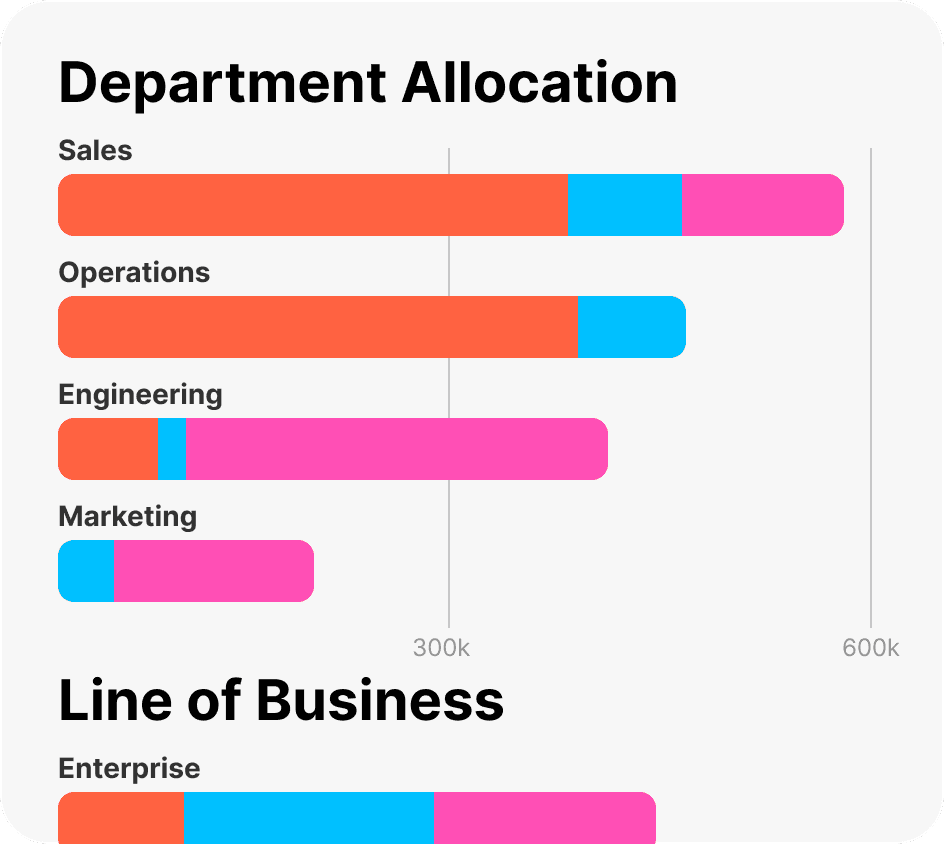
Firm accruals start from outside counsel’s estimates of unbilled work and decrease as invoices arrive. Poppy allocates each invoice to your configured categories. Budgets can be organization-wide or by firm, matter, or category, with threshold alerts.
Analytics show approved, pending, and unbilled spend in your home currency, with rates, hours, and trends by firm, matter, and timekeeper. See all budget, accrual, and reporting features.

How long will it take?
Going live with e-billing in Poppy
Implementation and ongoing support are included, and a year of historical invoices is imported free. Your firms keep billing as they do today. Most teams are live in days to a few weeks.
Starting from email and spreadsheets
Firms can email invoices straight to Poppy instead of an inbox. Your team sets the billing guidelines and approval chain.
Switching from another e-billing system
Poppy scopes any non-standard migration needs before you commit.

ALREADY ON ANOTHER E-BILLING PLATFORM?
How Poppy compares with four other e-billing platforms
POPPY VS
Legal Tracker
In its UK G-Cloud listing, Thomson Reuters describes a typical Legal Tracker implementation as three months.
POPPY VS
Brightflag
Per Brightflag’s help center, invoices become reviewable within 24 to 48 hours. A Forrester study Brightflag commissioned puts average go-live at 6 to 10 weeks.
POPPY VS
SimpleLegal
Onit retired the standalone SimpleLegal website and brand into onit.com in March 2026, and says the product remains fully supported.
POPPY VS
CounselLink
LexisNexis CounselLink is a full enterprise legal management suite. Poppy covers e-billing and legal spend management, not matter management.
Comparison facts last verified August 30, 2026. Sources are listed on each comparison page.
Questions about legal e-billing software
What in-house legal, Finance, and IT teams ask before choosing an e-billing platform.
See how Poppy would handle your outside counsel invoices
A 30-minute session tailored to your team covers intake, AI invoice review, approvals, and the handoff to Finance. Bring your questions or requirements list.